BAKIN (Banjarmasin Kini) : UI/UX Design for Banjarmasin Public Service Super Apps.
Overview
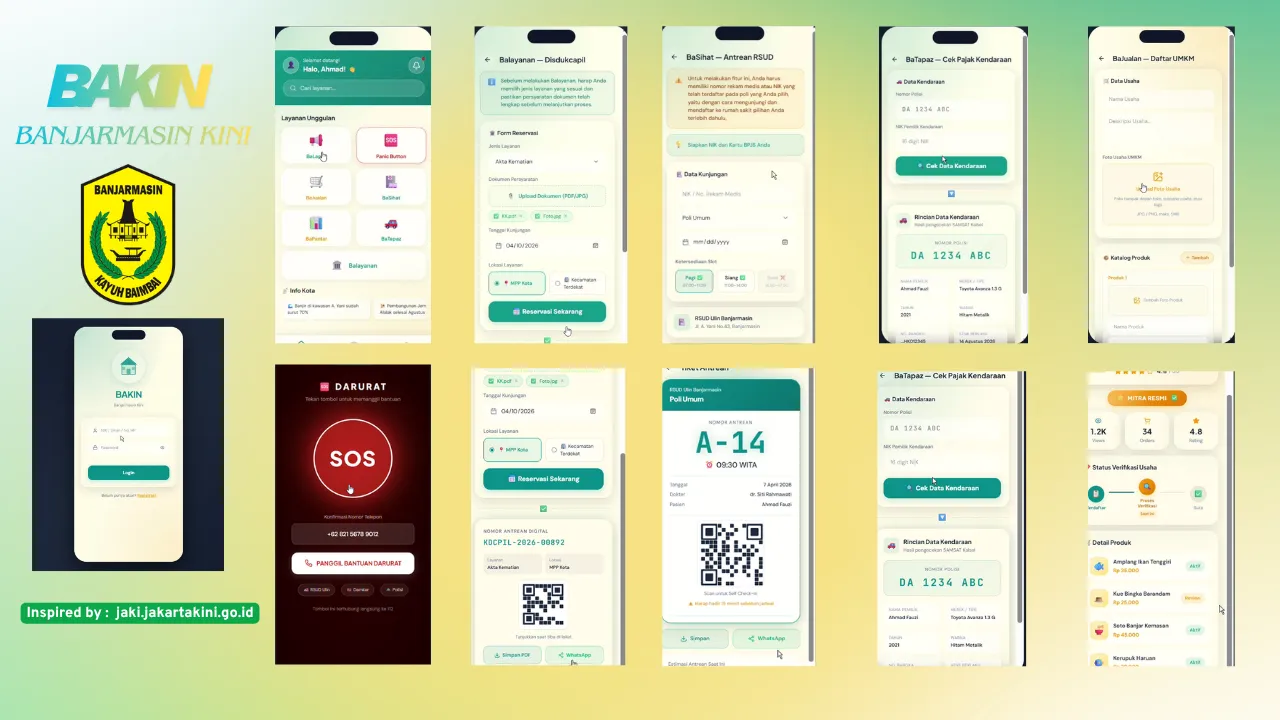
BAKIN (Banjarmasin Kini) is a mobile-based Super Apps concept for the public services of Banjarmasin city. Inspired by the success of JAKI (Jakarta Kini), this application integrates various municipal services into a single platform, including emergency responses, civil registration, commodity price monitoring, and local MSME empowerment. The project was fully built using Figma, adopting a modern UI/UX approach with a sleek glassmorphism concept. While implementing large-scale smart city functionalities, BAKIN strongly preserves Banjarmasin's visual identity by blending the region's signature green-teal color palette with subtle background touches of the traditional Sasirangan fabric pattern.
Field
CAT
Design UI/UX Mobile Apps
Year
2026
Role
Mobile UI/UX Designer
Case Narrative
1. Login & Register
- Login & Register Form: Uses a glassmorphism design equipped with OTP input.
- Background: Features a traditional Sasirangan fabric pattern background.
- Navigation: Equipped with a progress stepper to indicate development stages.
2. Dashboard (Main Page)
- Header: Features a teal (greenish-blue) gradient design.
- Main Features: A grid showcasing 7 service menus, complete with an animated pulse effect on the Panic Button.
- Other Components: A news ticker (scrolling news text) and a bottom navigation bar.
3. BaLapor Feature
- Input Page: Includes photo upload functionality, a category picker, a GPS map placeholder, and a textarea with a character counter.
- History Page: Directs users to a status tracker equipped with a unique report ID and stepper.
4. Panic Button Feature
- Main View: A full-screen dark red emergency interface with a pulsing SOS button powered by motion animation.
- Advanced View: Directs users to a live tracking map displaying the responder list.
5. BaJualan Feature (MSME)
- Registration: Form interface for local MSME partner registration.
- Partner Dashboard: Equipped with a shimmer-effect badge, business stats, training modules, and a product catalog grid.
6. BaSihat Feature
- Registration: Queue registration utilizing a Poli selection dropdown and time slot chips.
- Queue Ticket: Displays a digital ticket complete with a QR code and progress bar.
7. BaPantar Feature
- Search: Feature to lookup market commodity items.
- Price Dashboard: Displays an AreaChart (Recharts style), price summary chips, and a sortable price table.
8. BaTapaz Feature
- Search: License plate lookup functionality.
- Information: Displays complete vehicle tax details along with a payment status badge.
9. BaLayanan Feature
- Reservation: Document submission interface supporting multi-file uploads.
- Confirmation: Directs users to a digital queue with a QR code confirmation screen.
10. Profile
- Displays user statistics, a settings menu, and a logout button.
Technical Scope
"A synthesis of technical performance and aesthetic intent."
Visual Documentation
1 assets